Discover the best AI productivity tools to write, create, manage projects, and save time with free and paid AI solutions.
Artificial Intelligence is changing the way we work in 2026. From writing emails to creating videos and managing projects, AI tools help save time and improve efficiency. Whether you are a student, freelancer, content creator, or business owner, the right AI tool can make your daily work much easier.
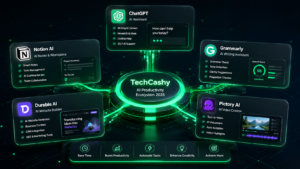
In this guide, we’ll explore the 5 best AI productivity tools in 2026, their features, pricing, and who should use them.

1. ChatGPT
Overview
ChatGPT is one of the most powerful AI assistants available today. It helps users write content, answer questions, generate ideas, summarize documents, write code, and much more. It has become an essential productivity tool for professionals across many industries.
Key Features
-
AI writing and content generation
-
Coding and debugging assistance
-
Email drafting and document summaries
-
Brainstorming ideas and research support
Best For
-
Bloggers
-
Students
-
Freelancers
-
Developers
-
Business professionals
Pricing
-
Free Plan: Available
-
Paid Plan: ChatGPT Plus starts at around $20/month
2. Notion AI
Overview
Notion AI combines note-taking, project management, and AI assistance in one platform. It helps organize information while generating summaries, meeting notes, and task lists automatically.
Key Features
-
AI-generated notes and summaries
-
Smart task management
-
Document writing assistance
-
Team collaboration tools
Best For
-
Teams
-
Students
-
Project Managers
-
Startups
Pricing
-
Free Plan: Basic features
-
Paid AI Add-on: Available with Notion plans
3. Grammarly
Overview
Grammarly helps improve writing quality by checking grammar, spelling, punctuation, tone, and clarity. In 2026, it also offers AI writing suggestions for emails, blogs, and reports.
Key Features
-
Grammar and spelling correction
-
Tone detection
-
AI writing assistance
-
Plagiarism checker (Premium)
Best For
-
Writers
-
Bloggers
-
Students
-
Business professionals
Pricing
-
Free Plan: Yes
-
Premium Plan: Starts around $12/month (annual billing)

4. Durable AI
Overview
Durable AI allows users to create a professional website within minutes using AI. It automatically generates website content, layouts, and business tools without requiring coding skills.
Key Features
-
AI website builder
-
Automatic business content generation
-
CRM integration
-
Marketing and SEO tools
Best For
-
Small businesses
-
Freelancers
-
Agencies
-
Local service providers
Pricing
-
Free Trial: Available
-
Paid Plans: Monthly subscription
5. Pictory AI
Overview
Pictory AI transforms articles, scripts, or text into engaging videos. It is especially useful for YouTubers, marketers, and social media creators who want to produce content quickly.
Key Features
-
Text-to-video conversion
-
AI voiceovers
-
Automatic subtitles
-
Video highlights and editing
Best For
-
YouTubers
-
Content creators
-
Digital marketers
-
Social media managers
Pricing
-
Free Trial: Available
-
Paid Plans: Monthly subscription
Comparison Table
Tool Name |
Main Feature |
Pricing |
ChatGPT |
AI writing, coding, research |
Free + Paid ($20/month) |
Notion AI |
Notes, tasks, document AI |
Free + Paid |
Grammarly |
Grammar and AI writing |
Free + Premium |
Durable AI |
AI website builder |
Free Trial + Paid |
Pictory AI |
Text-to-video creation |
Free Trial + Paid |
Which AI Tool Should You Choose?
The best AI tool depends on your needs:
-
Choose ChatGPT if you want an all-purpose AI assistant.
-
Choose Notion AI for productivity and project management.
-
Choose Grammarly to improve your writing.
-
Choose Durable AI to build websites quickly.
-
Choose Pictory AI for creating videos from text.